Church admin, quietly handled · For churches in Malaysia
Your church runs on three spreadsheets, a WhatsApp group and one person’s memory.
No card, and nothing to cancel. Tell us about your church and we will set it up.
Thirty days free, then RM 29 a month for a church under 100 — RM 99 up to 1,500.
One price for the whole church. Never per seat. No contract. See the bands
IN ONE PLACE
Your people and households · serving rotas · children’s check-in · attendance · groups · events and sign-ups · room bookings · giving records
Newcomers, groups and ministries
Nothing lives in one person’s head any more.
Less time on admin, more time on ministry.
This is the part that matters when someone leaves. Every record has a place, every note has a name against it, and nothing walks out of the door with the person who knew it.
You don’t have to switch it all on. Start with your people and one rota, and leave small groups, events and the rest until a ministry asks for them.
Newcomers and members
One directory, from a visitor’s first Sunday to a leader of fifteen years. Newcomer is a status, not a note. A family is one household, not four unrelated records, and every note carries the name of whoever wrote it.
Attendance and first-timers
Per service, so two services stay separate, with first-timers counted on the day.
Small groups, courses and ministry teams
Your youth group is a group like any other — its own leader, its own roster, its own register. Members request to join; the office approves. Events open for sign-ups with guest numbers, capacity and a waitlist.
Rooms and connect cards
Double-bookings are refused before they happen. A connect card for a newcomer, a survey, a sign-up form — all of them share one link.
Giving records
Gifts by fund and method, a member’s statement on request, administrators only. Not a payment system — ChapelHQ never touches your money.
Manage your volunteers
Serving teams, and who is on them. Volunteers mark the Sundays they are away, and auto-fill spreads the load instead of asking the same four people every month — which is the rota, further down this page.
Reports & exports
Attendance trends, giving summaries, people counts, and CSV export throughout. Exports of the people directory and the giving ledger are logged — who exported what, and when.
Signing in
Passwordless — a link by email, nothing to forget or reuse. Invite-only: nobody signs themselves up, the office adds them.
There is more than this. The full list is here — including what ChapelHQ deliberately doesn’t do.
Getting started
Four steps to get started.
You start with the spreadsheet you already have. Each step is useful on its own, so plenty of churches do the first two and never come back for the fourth.
STEP 1
Move your people across
Upload the spreadsheet you already have — a single Name column is enough. Every row is previewed and families are grouped into households before anything saves.
STEP 2
Build your first rota
Pick the team whose rota hurts most. Build four Sundays, publish, and see who confirms. Your spreadsheet stays where it is until you decide it is redundant — you are not running two systems.
STEP 3
Take attendance
Mark who was actually in the room, per service, so a church running two services never blurs them into one number. Group leaders take their own register and see nothing else. The trend appears once you have a few weeks behind you.
STEP 4
Small group ministry
Small groups, courses and ministry teams, each with its own leader and roster. Members request to join and the office approves, so a leader runs their group without seeing the rest of the church.
The rota · both halves
Stop rebuilding the rota every month.
A rota is two jobs, not one: building it, and getting people to answer. Both of them are yours today. Here is what each one looks like when it isn’t.
YOUR SIDE · THE OFFICE
Next month starts from last month. It suggests people for each slot and skips anyone who has said they can’t make it. Gaps are flagged on Tuesday instead of found on Sunday morning.

Amber is an unfilled slot, counted for you at the top of the page. It works on a phone too, one Sunday at a time.
THEIR SIDE · THE MEMBER
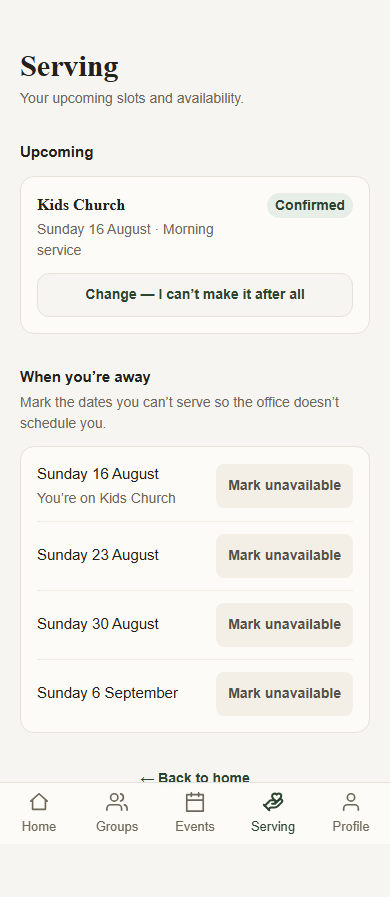
No password and no app to install. They tap the link in their email and they’re in, on their own phone, seeing only what concerns them.
- Confirm or decline in one tap. The office sees the reply, not a thread.
- Mark the Sundays you’re away. They won’t be scheduled on those dates.
- A reminder before their Sunday. By email, and as a push notification once the portal is on their home screen.
- Everything the church holds on them, downloadable by them, without asking you.
“We already use WhatsApp for this.”
Then keep it. You are not going to stop using WhatsApp and we are not going to ask you to — it is where your church already talks, and nothing here beats it at that.
What a WhatsApp group is bad at is being a record: who said yes three weeks ago, which Sundays still have nobody on sound, whether the adult at the door is allowed to collect that child.
Publish the rota here and every member on it gets their own dates by email. Tell the group in WhatsApp, as you always have — same conversation, one source of truth behind it.
Children & check-in
The part you can’t afford to get wrong.
Every child gets a printed tag, torn in two. Half stays on the child, half goes to the adult who brought them. Both halves carry the allergy in red and the same six-digit code, and the code is checked against the authorised pickup list at collection.
- One authorised pickup list per child, and being on it is the authorisation. Anyone else is a supervised release.
- If someone not on the list turns up, you can still release the child — the record captures who, why, and in whose name.
- A register of who was in which room, on any date. Every action logged.
- Medical detail is kept away from the people running the desk.
CHILD · STAYS WITH CHILD
Ruth Nadarajah
Preschool · Sat, 1 Aug
⚠ Peanuts — severe, carries EpiPen
Pickup code
624432
GUARDIAN · KEEP THIS TAG
Ruth Nadarajah
Preschool · Sat, 1 Aug
⚠ Peanuts — severe, carries EpiPen
Pickup code
624432
What the printer produces at check-in.
One price for the whole church.
By the size of your congregation, not the number of people who log in. Children don’t count toward the band. Thirty days free to start; after that, no contract and no card details — we invoice you.
| Up to 99 people | RM 29 / mo |
| 100–300 | RM 49 / mo |
| 301–600 | RM 79 / mo |
| 601–1,500 | RM 99 / mo |
| Over 1,500 | Let’s talk |
Your congregation’s data stays yours, and stays here.
Your members’ records sit under Malaysian law and are handled under the PDPA. Members can see and download their own data, or ask for it to be deleted, and the office gets a queue with the 30-day clock already running. Children’s records are never included in another member’s download.
And you can leave whenever you like: people, attendance, giving and the children’s register all export to CSV from inside the app, without asking us.
Tell us about your Sundays.
How many people, how many services, and which part of the admin takes the most time. That’s enough for us to tell you whether ChapelHQ helps — including if the answer is no.
- A reply within three working days. A real answer to what you asked, written by someone who knows the software.
- A look at the software. Screen share, half an hour, your questions.
- If it fits, your people move across. Import the spreadsheet yourself in a few minutes, or send it over and we will.